ez_py

前面的都正常处理,key解包出来的文件找到key.pyc,在解出源码,但是因为网站解的不能运行

把字节码复制到deepseek上,去得到了一个源码

1
2
3
4
5
6
7
8
9
10
11
12
13
14
15
16
17
18
19
20
21
22
23
24
25
26
27
28
29
30
31
32
33
34
35
36
37
38
39
40
41
42
43
44
45
46
47
48
49
50
51
52
53
54
55
56
57
58
59
60
61
62
63
64
65
66
67
68
69
70
71
72
73
74
75
76
77
78
79
80
81
82
83
84
85
86
87
88
89
90
91
92
93
94
95
96
97
98
99
100
101
102
103
104
105
106
107
108
109
110
111
112
113
114
115
116
117
118
119
120
121
122
123
124
125
126
127
128
129
130
131
132
133
134
135
136
137
138
139
140
141
142
143
144
145
146
147
148
149
150
151
152
153
154
155
156
157
158
159
160
161
162
163
164
165
166
167
168
169
170
171
172
173
174
175
176
177
178
179
180
181
182
183
184
185
186
187
188
189
190
191
192
193
194
195
196
197
198
199
200
201
202
203
204
205
206
207
208
209
210
211
212
213
214
215
216
217
218
219
220
221
222
223
224
225
226
227
228
229
230
231
232
233
234
235
236
237
238
239
240
241
242
243
244
245
246
247
248
249
250
251
252
253
254
255
256
257
258
259
260
261
262
263
264
265
266
267
268
269
270
271
272
273
274
275
276
277
278
279
280
281
282
283
284
285
286
287
288
289
290
291
292
293
294
295
296
297
298
299
300
301
302
303
304
305
306
307
308
309
310
311
312
313
314
315
316
317
318
319
320
321
322
323
324
325
326
327
328
329
330
331
332
333
334
335
336
337
338
339
340
341
342
343
344
345
346
347
348
349
350
351
352
353
354
355
356
357
358
359
360
361
362
363
364
365
366
367
368
369
370
371
# Decompiled with PyLingual (https://pylingual.io)
# Internal filename: key.py
# Bytecode version: 3.13.0rc3 (3571)
# Source timestamp: 1970-01-01 00:00:00 UTC (0)

import ast
import types
import sys

# 正确的密钥结果
o0o0o0 = [105084753, 3212558540, 351342182, 844102737, 2002504052, 356536456, 2463183122, 615034880, 1156203296]


def changli(o0o0o1, o0o0o2, o0o0o3):
"""TEA加密算法的变种实现"""
o0o0o4 = 2269471011
o0o0o5 = o0o0o3 & 0xFFFFFFFF
o0o0o6 = (o0o0o3 >> 8) ^ 305419896 & 0xFFFFFFFF
o0o0o7 = (o0o0o3 << 4) ^ 2271560481 & 0xFFFFFFFF
o0o0o8 = (o0o0o3 >> 12) ^ 2882400000 & 0xFFFFFFFF

o0o0o9 = o0o0o1 & 0xFFFFFFFF
o0o0o10 = o0o0o2 & 0xFFFFFFFF
o0o0o11 = 0

for _ in range(32):
o0o0o11 = (o0o0o11 + o0o0o4) & 0xFFFFFFFF

o0o0o9 = (o0o0o9 + ((o0o0o9 << 4) + o0o0o5) ^ (o0o0o10 + o0o0o11) ^ ((o0o0o10 >> 4) + o0o0o6)) & 0xFFFFFFFF
o0o0o10 = (o0o0o10 + ((o0o0o10 << 4) + o0o0o7) ^ (o0o0o9 + o0o0o11) ^ ((o0o0o9 >> 4) + o0o0o8)) & 0xFFFFFFFF

return o0o0o9, o0o0o10


def Shorekeeper(o0o0o12):
"""将32位整数分割为高16位和低16位"""
o0o0o13 = o0o0o12 >> 16
o0o0o14 = o0o0o12 & 0xFFFF
return o0o0o13, o0o0o14


def Kathysia(o0o0o15, o0o0o16):
"""将两个16位整数合并为32位整数"""
return (o0o0o15 << 16) | (o0o0o16 + 0)


def Phrolova(o0o0o17):
"""动态创建Carlotta函数并注入到全局命名空间"""
o0oA = "Carlotta"
o0oB = ['o0oC', 'o0oD', 'o0oE', 'o0oF']
o0oG = []

# 构建AST节点 - 一系列赋值语句
o0oG.append(ast.Assign(
targets=[ast.Name(id='o0oH', ctx=ast.Store())],
value=ast.Constant(value=305419896)
))

o0oG.append(ast.Assign(
targets=[ast.Name(id='o0oI', ctx=ast.Store())],
value=ast.BinOp(
left=ast.Name(id='o0oE', ctx=ast.Load()),
op=ast.BitAnd(),
right=ast.Constant(value=65535)
)
))

o0oG.append(ast.Assign(
targets=[ast.Name(id='o0oJ', ctx=ast.Store())],
value=ast.BinOp(
left=ast.BinOp(
left=ast.Name(id='o0oE', ctx=ast.Load()),
op=ast.RShift(),
right=ast.Constant(value=16)
),
op=ast.BitAnd(),
right=ast.Constant(value=65535)
)
))

o0oG.append(ast.Assign(
targets=[ast.Name(id='o0oK', ctx=ast.Store())],
value=ast.BinOp(
left=ast.BinOp(
left=ast.Name(id='o0oE', ctx=ast.Load()),
op=ast.BitXor(),
right=ast.Name(id='o0oF', ctx=ast.Load())
),
op=ast.BitAnd(),
right=ast.Constant(value=65535)
)
))

o0oG.append(ast.Assign(
targets=[ast.Name(id='o0oL', ctx=ast.Store())],
value=ast.BinOp(
left=ast.BinOp(
left=ast.BinOp(
left=ast.Name(id='o0oE', ctx=ast.Load()),
op=ast.RShift(),
right=ast.Constant(value=8)
),
op=ast.BitXor(),
right=ast.Name(id='o0oF', ctx=ast.Load())
),
op=ast.BitAnd(),
right=ast.Constant(value=65535)
)
))

o0oG.append(ast.Assign(
targets=[ast.Name(id='o0oM', ctx=ast.Store())],
value=ast.BinOp(
left=ast.BinOp(
left=ast.Name(id='o0oH', ctx=ast.Load()),
op=ast.Mult(),
right=ast.BinOp(
left=ast.Name(id='o0oF', ctx=ast.Load()),
op=ast.Add(),
right=ast.Constant(value=1)
)
),
op=ast.BitAnd(),
right=ast.Constant(value=0xFFFFFFFF)
)
))

# 复杂的表达式计算
o0oG.append(ast.Assign(
targets=[ast.Name(id='o0oN', ctx=ast.Store())],
value=ast.BinOp(
left=ast.BinOp(
left=ast.BinOp(
left=ast.BinOp(
left=ast.BinOp(
left=ast.Name(id='o0oD', ctx=ast.Load()),
op=ast.LShift(),
right=ast.Constant(value=5)
),
op=ast.Add(),
right=ast.Name(id='o0oI', ctx=ast.Load())
),
op=ast.BitXor(),
right=ast.BinOp(
left=ast.Name(id='o0oD', ctx=ast.Load()),
op=ast.Add(),
right=ast.Name(id='o0oM', ctx=ast.Load())
)
),
op=ast.BitXor(),
right=ast.BinOp(
left=ast.BinOp(
left=ast.Name(id='o0oD', ctx=ast.Load()),
op=ast.RShift(),
right=ast.Constant(value=5)
),
op=ast.Add(),
right=ast.Name(id='o0oJ', ctx=ast.Load())
)
),
op=ast.BitAnd(),
right=ast.Constant(value=65535)
)
))

o0oG.append(ast.Assign(
targets=[ast.Name(id='o0oP', ctx=ast.Store())],
value=ast.BinOp(
left=ast.BinOp(
left=ast.Name(id='o0oC', ctx=ast.Load()),
op=ast.Add(),
right=ast.Name(id='o0oN', ctx=ast.Load())
),
op=ast.BitAnd(),
right=ast.Constant(value=65535)
)
))

# 更多复杂的表达式
o0oG.append(ast.Assign(
targets=[ast.Name(id='o0oN', ctx=ast.Store())],
value=ast.BinOp(
left=ast.BinOp(
left=ast.BinOp(
left=ast.BinOp(
left=ast.BinOp(
left=ast.Name(id='o0oP', ctx=ast.Load()),
op=ast.LShift(),
right=ast.Constant(value=5)
),
op=ast.Add(),
right=ast.Name(id='o0oK', ctx=ast.Load())
),
op=ast.BitXor(),
right=ast.BinOp(
left=ast.Name(id='o0oP', ctx=ast.Load()),
op=ast.Add(),
right=ast.Name(id='o0oM', ctx=ast.Load())
)
),
op=ast.BitXor(),
right=ast.BinOp(
left=ast.BinOp(
left=ast.Name(id='o0oP', ctx=ast.Load()),
op=ast.RShift(),
right=ast.Constant(value=5)
),
op=ast.Add(),
right=ast.Name(id='o0oL', ctx=ast.Load())
)
),
op=ast.BitAnd(),
right=ast.Constant(value=65535)
)
))

o0oG.append(ast.Assign(
targets=[ast.Name(id='o0oQ', ctx=ast.Store())],
value=ast.BinOp(
left=ast.BinOp(
left=ast.Name(id='o0oD', ctx=ast.Load()),
op=ast.Add(),
right=ast.Name(id='o0oN', ctx=ast.Load())
),
op=ast.BitAnd(),
right=ast.Constant(value=65535)
)
))

# 返回语句
o0oG.append(ast.Return(
value=ast.Tuple(
elts=[
ast.Name(id='o0oP', ctx=ast.Load()),
ast.Name(id='o0oQ', ctx=ast.Load())
],
ctx=ast.Load()
)
))

# 构建函数定义
func_def = ast.FunctionDef(
name=o0oA,
args=ast.arguments(
posonlyargs=[],
args=[ast.arg(arg=arg_name) for arg_name in o0oB],
kwonlyargs=[],
kw_defaults=[],
defaults=[]
),
body=o0oG,
decorator_list=[]
)

# 解析辅助函数代码
helper_code = """
def _tea_helper_func(a, b, c):
magic1 = (a ^ b) & 0xDEADBEEF
magic2 = (c << 3) | (a >> 5)
return (magic1 + magic2 - (b & 0xCAFEBABE)) & 0xFFFFFFFF

def _fake_tea_round(x, y):
return ((x * 0x9E3779B9) ^ (y + 0x12345678)) & 0xFFFFFFFF

_tea_magic_delta = 0x9E3779B9 ^ 0x12345678
_tea_dummy_keys = [0x1111, 0x2222, 0x3333, 0x4444]
"""
parsed_helper = ast.parse(helper_code).body

# 创建模块
module = ast.Module(
body=[func_def] + parsed_helper,
type_ignores=[]
)

# 修复AST位置信息并编译
ast.fix_missing_locations(module)
compiled = compile(module, "<tea_obf_ast>", "exec")

# 执行编译的代码
namespace = {}
exec(compiled, namespace)

# 将函数注入到全局命名空间
if o0oA in namespace:
o0o0o17[o0oA] = namespace[o0oA]


def shouan(o0o0o32):
"""主加密验证函数"""
if len(o0o0o32) != 9:
raise ValueError("需要输入9个key")

o0o0o35 = []

# 处理每个输入密钥
for o0o0o49, o0o0o34 in enumerate(o0o0o32):
o0o0o33 = o0o0o49 * o0o0o49

# 分割密钥
o0o0o36, o0o0o37 = Shorekeeper(o0o0o34)

# 调用动态创建的Carlotta函数
o0o0o38, o0o0o39 = Carlotta(o0o0o36, o0o0o37, o0o0o49 + 2025, o0o0o33)

# 合并结果
o0o0o40 = Kathysia(o0o0o38, o0o0o39)

o0o0o35.append(o0o0o40)

o0o0o41 = []

# 对密钥进行轮处理
for i in range(8):
# 使用changli函数进行变换
o0o0o35[i], o0o0o35[i + 1] = changli(o0o0o35[i], o0o0o35[i + 1], 2025)
o0o0o41.append(o0o0o35[i])

o0o0o41.append(o0o0o35[8])
return o0o0o41


def jinhsi():
"""主交互函数"""
print("请输入9个数字:")

try:
o0o0o46 = input().strip()

# 解析输入
if "," in o0o0o46:
o0o0o42 = o0o0o46.split(",")
else:
o0o0o42 = o0o0o46.split()

if len(o0o0o42) != 9:
print("错误: 需要输入9个数")
return

o0o0o43 = []

# 转换为整数
for o0o0o44 in o0o0o42:
try:
o0o0o45 = int(o0o0o44.strip())
o0o0o43.append(o0o0o45)
except ValueError:
print(f"错误: '{o0o0o44}' 不是有效的整数")
return

# 调用shouan函数进行验证
o0o0o48 = shouan(o0o0o43)

# 验证结果
if o0o0o48 == o0o0o0:
print("正确!这是真正的key")
sys.exit(0)
else:
print("错误!这不是正确的key")
print(f"你的结果: {o0o0o48}")
sys.exit(0)

except Exception as o0o0o47:
print(f"发生错误: {o0o0o47}")


# 初始化:动态创建Carlotta函数
Phrolova(globals())

if __name__ == "__main__":
jinhsi()

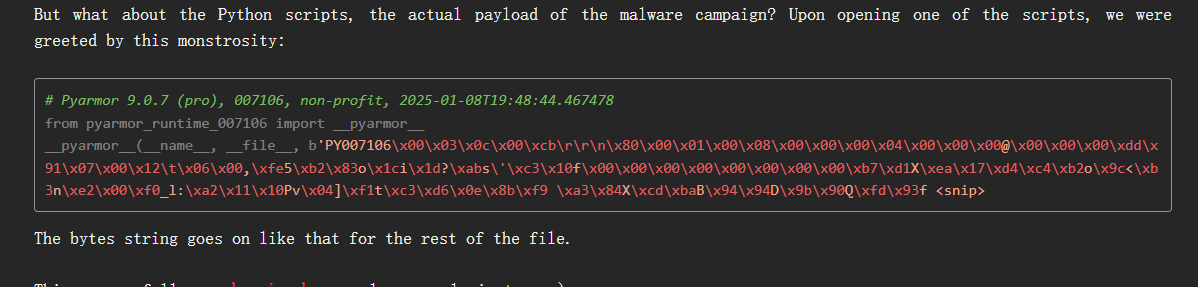
另一个src文件经过了pyarmor加密,用https://github.com/Lil-House/Pyarmor-Static-Unpack-1shot解包

因为解包了好久解不出来

后来找的资料里发现有的py文件是有头部的Unpacking Pyarmor v8+ scripts | cyber.wtf

image-20251014163826307

image-20251014163643241

然后将py文件补个头部,重新解包一下

1
D:\python313>python "D:\test\ycb\pyarmor-1shot-v0.2.1-windows-x86_64 (2)\oneshot\shot.py" -r D:\test\ycb\ezpy\src\pyarmor\pyarmor_runtime.pyd D:\test\ycb\ezpy\src\src.py

得到src文件里面是rc4,且有密文了

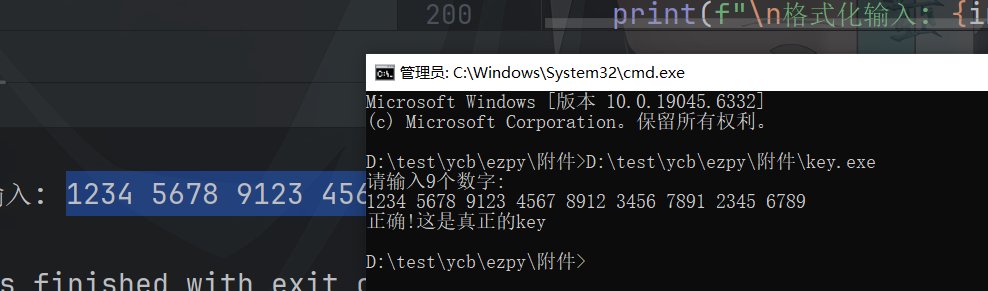
密钥则是用刚刚还原到的key源码得到,这样

image-20251014155803366

1
2
3
4
5
6
7
8
9
10
11
12
13
14
15
16
17
18
19
20
21
22
23
24
25
26
27
28
29
30
31
32
33
34
35
36
37
38
39
40
41
42
43
44
45
46
47
48
49
50
51
52
53
54
55
56
57
58
59
60
61
62
63
64
65
66
67
68
69
70
71
72
73
74
75
76
77
78
79
80
81
82
83
84
85
86
87
88
89
90
91
92
93
94
95
96
97
98
99
100
101
102
# decrypt.py
cipher = [
1473,
3419,
9156,
1267,
9185,
2823,
7945,
618,
7036,
2479,
5791,
1945,
4639,
1548,
3634,
3502,
2433,
1407,
1263,
3354,
9274,
1085,
8851,
3022,
8031,
734,
6869,
2644,
5798,
1862,
4745,
1554,
3523,
3631,
2512,
1499,
1221,
3226,
9237
]

key_segments = [1234, 5678, 9123, 4567, 8912, 3456, 7891, 2345, 6789]

def init(key_bytes, key_len):
# KSA (像 RC4 的初始化)
S = list(range(256))
j = 0
for i in range(256):
j = (j + S[i] + key_bytes[i % key_len]) % 256
S[i], S[j] = S[j], S[i]
return S

def make(box):
# PRGA(但伪代码里在生成 keystream 时多加了 i % 23 的偏移)
i = 0
j = 0
ks = []
for counter in range(256):
i = (i + 1) % 256
j = (j + box[i]) % 256
box[i], box[j] = box[j], box[i]
idx = (box[i] + box[j] + (counter % 23)) % 256
ks.append(box[idx])
return ks

def decrypt(cipher, key_segments):

mod_bytes = [k % 0xff for k in key_segments] # each in 0..254
box = init(bytes(mod_bytes), len(mod_bytes))
keystream = make(box)

flag_bytes = []
for i in range(len(cipher)):
# 取对应的 offset 值(伪代码里的 _)
if i % 2 == 0:
offset = key_segments[i % 9]
else:
offset = (key_segments[i % 9] * 2) % 0xFFF
ks_val = keystream[i % len(keystream)]
# 加法后取低 8 位(与伪代码兼容且能与字节异或)
add_val = (ks_val + offset) & 0xFF
cipher_byte = cipher[i] & 0xFF
plain_byte = cipher_byte ^ add_val
flag_bytes.append(plain_byte)

# 尝试解码为可读字符串(若有非 printable 则使用替代字符)
try:
flag = bytes(flag_bytes).decode('utf-8')
except UnicodeDecodeError:
flag = ''.join((chr(b) if 32 <= b < 127 else f'\\x{b:02x}') for b in flag_bytes)

return flag, flag_bytes

if __name__ == '__main__':
plaintext, bytes_list = decrypt(cipher, key_segments)
print("Recovered flag (as printable):")
print(plaintext)
print()
print("Recovered bytes (decimal):")
print(bytes_list)

easyTauri

tauri框架的游戏

[Tauri 框架的静态资源提取方法探究 | yllhwa’s blog](https://blog.yllhwa.com/2023/05/09/Tauri 框架的静态资源提取方法探究/)

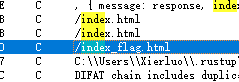
首先定位到index.html,但是查看引用的时候,并没有像文章里一样找到他的地址

在这个的下面有一个index_flag.html的,查看引用可以发现好多文件以及其文件内容地址

image-20251016173020039

把他们dump出来,然后用脚本解压

image-20251016173210422

这里我们可以找到好多js文件,在game_manager.js、html_actuator.js、main.js文件里面找到了点东西

1
2
3
4
5
6
7
import brotli

content = open("manage.js.br", "rb").read()
print(len(content))

decompressed = brotli.decompress(content)
open("managetwo.js","wb").write(decompressed)

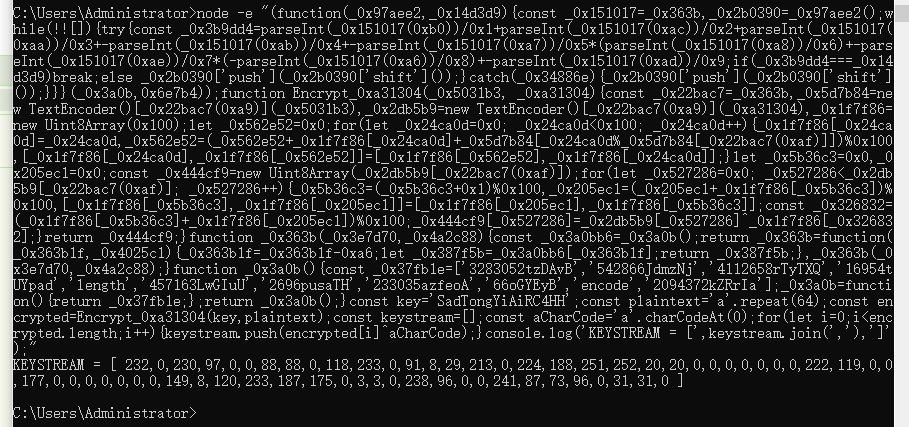
下面这个是html_actuator.js去混淆之后的样子,可以看到一些前后端的关系,还有rc4加密

首先是玩出2048之后输入flag,输入经过rc4->base最后返回给了后端

1
2
3
4
5
6
7
8
9
10
11
12
13
14
15
16
17
18
19
20
21
22
23
24
25
26
27
28
29
30
31
32
33
34
35
36
37
38
39
40
41
42
43
44
45
46
47
48
49
50
51
52
53
54
55
56
57
58
59
60
61
62
63
64
65
66
67
68
69
70
71
72
73
74
75
76
77
78
79
80
81
82
83
84
85
86
87
88
89
90
91
92
93
94
95
96
97
98
99
100
101
102
103
104
105
106
107
108
109
110
111
112
113
114
115
116
117
118
119
120
121
122
123
124
125
126
127
128
129
130
131
132
133
134
135
136
137
138
139
140
141
142
143
144
145
146
147
148
149
150
151
152
153
154
155
156
157
158
159
160
161
162
163
164
165
166
167
168
169
170
171
172
173
174
175
176
177
178
179
180
181
182
183
184
185
186
187
188
189
190
191
192
193
194
195
196
197
198
199
200
201
202
203
204
205
206
207
208
209
210
211
212
213
214
215
216
217
218
219
220
221
222
223
224
225
226
227
228
229
230
231
232
233
234
235
236
237
238
239
240
241
242
243
244
245
246
247
248
249
250
251
252
253
254
255
256
257
258
259
260
261
262
263
264
265
266
267
268
269
270
271
272
273
274
275
276
277
278
279
280
281
282
283
284
285
286
287
288
289
290
291
292
293
294
295
296
297
298
299
300
301
302
303
304
305
306
307
308
309
310
311
312
313
314
315
316
317
318
319
320
321
322
323
324
325
// 定义游戏管理器类
class GameManager {
tileContainer: HTMLElement;
scoreContainer: HTMLElement;
bestContainer: HTMLElement;
messageContainer: HTMLElement;
score: number;

constructor() {
this.tileContainer = document.querySelector(".tile-container")!;
this.scoreContainer = document.querySelector(".score-container")!;
this.bestContainer = document.querySelector(".best-container")!;
this.messageContainer = document.querySelector(".game-message")!;
this.score = 0;
}

/**
* 更新游戏界面显示
* @param grid 游戏网格数据
* @param metadata 游戏状态信息
*/
actuate(grid: Grid, metadata: GameMetadata): void {
const self = this;

// 如果游戏存在,则添加表单
if (metadata.game) {
const checkBox = document.querySelector(".check-form");
const checkBoxHtml = `
<form class="above-game" id="greet-form">
<input id="greet-input" placeholder="Enter a Flag..." />
<button type="submit">Check</button>
</form>
`;
if (checkBox) {
checkBox.innerHTML = checkBoxHtml;
}
}

window.requestAnimationFrame(() => {
self.clearContainer(self.tileContainer);

// 绘制所有格子
grid.cells.forEach(row => {
row.forEach(cell => {
if (cell) {
self.addTile(cell);
}
});
});

// 更新分数和最佳分数
self.updateScore(metadata.score);
self.updateBestScore(metadata.bestScore);

// 处理游戏结束状态
if (metadata.terminated) {
if (metadata.over) {
self.message(false); // You lose
} else if (metadata.won) {
self.message(true); // You win!
}
}
});
}

/**
* 继续游戏(重启或继续)
*/
continueGame(): void {
this.clearMessage();
}

/**
* 清空容器内的所有元素
* @param container 需要清空的容器
*/
clearContainer(container: HTMLElement): void {
while (container.firstChild) {
container.removeChild(container.firstChild);
}
}

/**
* 添加一个方块到游戏界面上
* @param tile 方块对象
*/
addTile(tile: Tile): void {
const self = this;
const wrapper = document.createElement("div");
const inner = document.createElement("div");

// 获取位置信息
const previousPosition = tile.previousPosition || { x: tile.x, y: tile.y };
const positionClass = this.positionClass(previousPosition);

// 构建CSS类名数组
let classes = ["tile", `tile-${tile.value}`, positionClass];

if (tile.value > 2048) {
classes.push("tile-super");
}

this.applyClasses(wrapper, classes);
inner.classList.add("tile-inner");
inner.textContent = String(tile.value);

// 处理不同的动画情况
if (tile.previousPosition) {
// 移动动画
window.requestAnimationFrame(() => {
classes[2] = self.positionClass({ x: tile.x, y: tile.y });
self.applyClasses(wrapper, classes);
});
} else if (tile.mergedFrom) {
// 合并动画
classes.push("tile-merged");
this.applyClasses(wrapper, classes);

// 渲染被合并的方块
tile.mergedFrom.forEach(mergedTile => {
self.addTile(mergedTile);
});
} else {
// 新增方块动画
classes.push("tile-new");
this.applyClasses(wrapper, classes);
}

// 将内部元素添加到包装器中,并将包装器添加到游戏区域
wrapper.appendChild(inner);
this.tileContainer.appendChild(wrapper);
}

/**
* 应用CSS类名到元素上
* @param element 目标元素
* @param classes 类名数组
*/
applyClasses(element: HTMLElement, classes: string[]): void {
element.setAttribute("class", classes.join(" "));
}

/**
* 标准化坐标位置(从0开始转为从1开始)
* @param position 原始位置
* @returns 标准化后的位置
*/
normalizePosition(position: Position): Position {
return {
x: position.x + 1,
y: position.y + 1
};
}

/**
* 生成位置对应的CSS类名
* @param position 位置信息
* @returns CSS类名字符串
*/
positionClass(position: Position): string {
const normalized = this.normalizePosition(position);
return `tile-position-${normalized.x}-${normalized.y}`;
}

/**
* 更新当前分数显示
* @param score 新分数
*/
updateScore(score: number): void {
this.clearContainer(this.scoreContainer);

const difference = score - this.score;
this.score = score;
this.scoreContainer.textContent = String(this.score);

// 显示分数增加动画
if (difference > 0) {
const addition = document.createElement("div");
addition.classList.add("score-addition");
addition.textContent = `+${difference}`;
this.scoreContainer.appendChild(addition);
}
}

/**
* 更新最佳分数显示
* @param bestScore 最佳分数
*/
updateBestScore(bestScore: number): void {
this.bestContainer.textContent = String(bestScore);
}

/**
* 显示游戏消息(胜利或失败)
* @param won 是否获胜
*/
message(won: boolean): void {
const type = won ? "game-won" : "game-over";
const message = won ? "You win!" : "Game over!";

this.messageContainer.classList.add(type);
this.messageContainer.getElementsByTagName("p")[0].textContent = message;
}

/**
* 清除游戏消息显示
*/
clearMessage(): void {
this.messageContainer.classList.remove("game-won");
this.messageContainer.classList.remove("game-over");
}
}

// 定义相关类型
interface Position {
x: number;
y: number;
}

interface Tile {
x: number;
y: number;
value: number;
previousPosition?: Position;
mergedFrom?: Tile[];
}

interface Grid {
cells: Tile[][];
}

interface GameMetadata {
score: number;
bestScore: number;
terminated?: boolean;
over?: boolean;
won?: boolean;
game?: boolean;
}

// RC4加密函数相关变量
let inputElement: HTMLInputElement | null;
let messageElement: HTMLElement | null;

/**
* RC4解密函数
* @param key 密钥
* @param data 待解密数据
* @returns 解密后的字节数组
*/
function rc4Decrypt(key: string, data: string): Uint8Array {
const keyBytes = new TextEncoder().encode(key);
const dataBytes = new TextEncoder().encode(data);
const s = new Uint8Array(256);
let i = 0;

// 初始化S盒
for (let j = 0; j < 256; j++) {
s[j] = j;
i = (i + s[j] + keyBytes[j % keyBytes.length]) % 256;
[s[j], s[i]] = [s[i], s[j]];
}

// 生成密钥流并解密
let x = 0;
let y = 0;
const result = new Uint8Array(dataBytes.length);

for (let j = 0; j < dataBytes.length; j++) {
x = (x + 1) % 256;
y = (y + s[x]) % 256;
[s[x], s[y]] = [s[y], s[x]];
const t = (s[x] + s[y]) % 256;
result[j] = dataBytes[j] ^ s[t];
}

return result;
}

/**
* 将Uint8Array转换为Base64编码字符串
* @param bytes 字节数组
* @returns Base64编码字符串
*/
function uint8ArrayToBase64(bytes: Uint8Array): string {
const binaryString = Array.from(bytes)
.map(byte => String.fromCharCode(byte))
.join("");
return btoa(binaryString);
}

/**
* 调用Tauri IPC命令处理输入
*/
async function handleGreetSubmit(): Promise<void> {
inputElement = document.querySelector("#greet-input");
messageElement = document.querySelector("#greet-msg");

if (!inputElement || !messageElement) return;

const inputValue = inputElement.value;
const decryptedData = rc4Decrypt("SadTongYiAiRC4HH", inputValue);
const base64Data = uint8ArrayToBase64(decryptedData);

try {
// 调用Tauri后端命令
const { invoke } = window.__TAURI__.core;
messageElement.textContent = await invoke("ipc_command", {
name: base64Data
});
} catch (error) {
console.error("IPC调用失败:", error);
}
}

// 页面加载完成后绑定事件监听器
window.addEventListener("DOMContentLoaded", () => {
const form = document.getElementById("check-form");
if (form) {
form.addEventListener("submit", (event) => {
event.preventDefault();
handleGreetSubmit();
});
}
});

image-20251016164144304

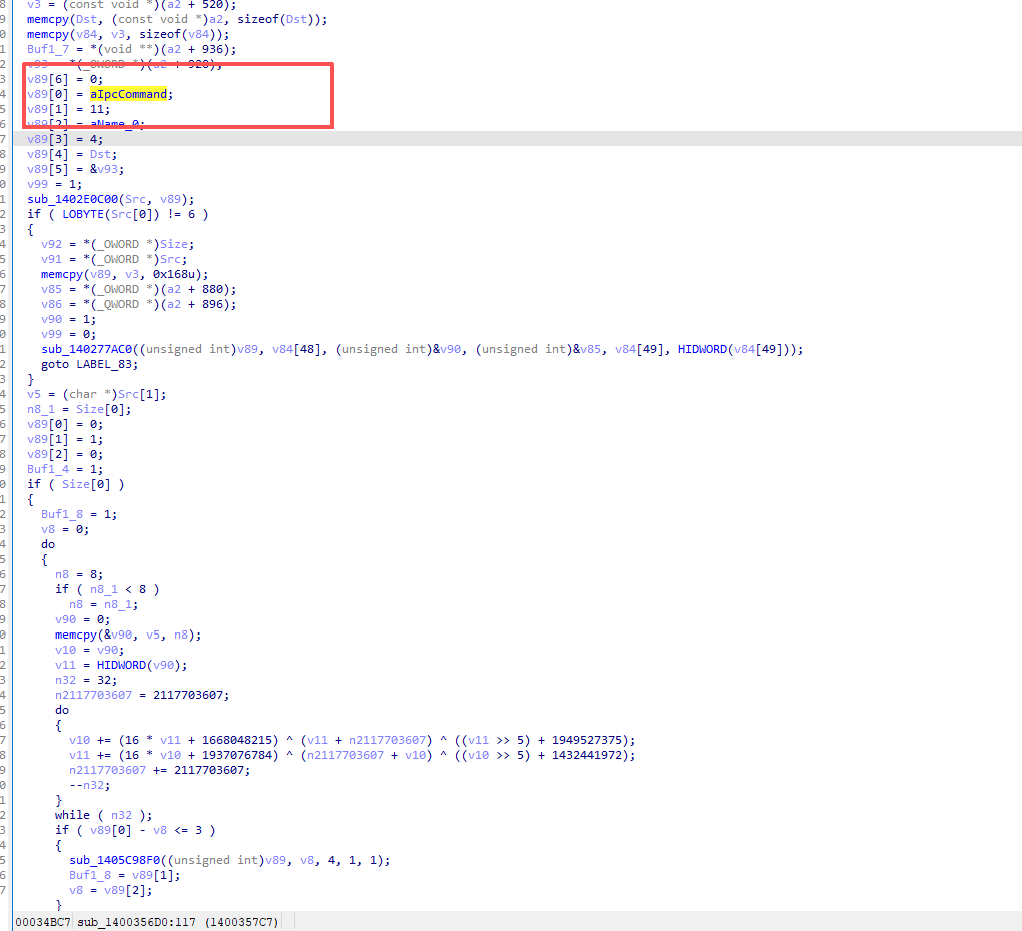
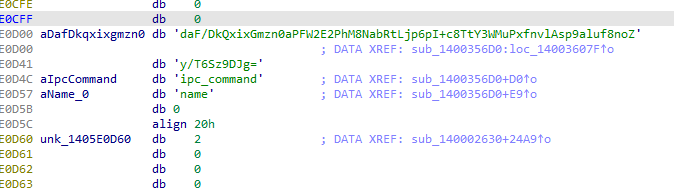
回到ida里面我在字符串中找到了base表的东西上下翻动可以看见ipc_command,是之前js中利用的东西

然后查找,可以发现tea加密

image-20251016170018292

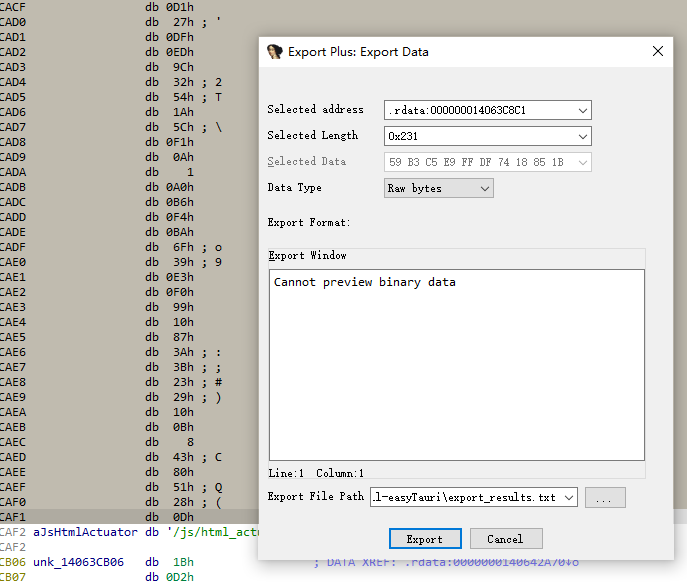
tea魔改 -> base -> 密文,这里是密文

image-20251016172836169

1
2
3
4
5
6
7
8
9
10
11
12
13
14
15
16
17
18
19
20
21
22
23
24
25
26
27
28
29
30
31
32
33
34
35
36
37
38
39
40
41
42
43
44
45
46
47
48
49
50
51
52
53
54
55
56
57
58
59
60
61
62
63
64
65
66
67
68
69
70
71
72
73
74
75
76
77
78
79
80
81
82
83
#include <stdio.h>
#include <stdint.h>
#include <stdlib.h>
#include <string.h>
#include <math.h>

static const unsigned char b64tab[] = "ABCDEFGHIJKLMNOPQRSTUVWXYZabcdefghijklmnopqrstuvwxyz0123456789+/";

unsigned char *b64decode(const char *in, size_t *outlen) {
size_t len = strlen(in);
unsigned char *out = malloc(len * 3 / 4 + 1);
unsigned char val[256];
memset(val, 0x80, sizeof(val));
for (int i = 0; i < 64; i++) val[b64tab[i]] = i;

unsigned acc = 0;
int bits = 0, cnt = 0;
for (size_t i = 0; i < len; i++) {
unsigned c = val[(unsigned char)in[i]];
if (c & 0x80) continue;
acc = (acc << 6) | c;
bits += 6;
if (bits >= 8) {
bits -= 8;
out[cnt++] = (acc >> bits) & 0xFF;
}
}
*outlen = cnt;
return out;
}

void tea_decrypt(uint8_t *buf, size_t len) {
uint32_t a = 0x636C6557, b = 0x74336D4F, c = 0x73757230, d = 0x55615474;
uint32_t delta = 0x7E3997B7, n = 32;

for (size_t i = 0; i < len; i += 8) {
uint32_t x = (buf[i] << 24) | (buf[i+1] << 16) | (buf[i+2] << 8) | buf[i+3];
uint32_t y = (buf[i+4] << 24) | (buf[i+5] << 16) | (buf[i+6] << 8) | buf[i+7];
uint32_t z = delta * n;

for (uint32_t j = 0; j < n; j++) {
y -= ((x << 4) + c) ^ (x + z) ^ ((x >> 5) + d);
y &= 0xFFFFFFFF;
x -= ((y << 4) + a) ^ (y + z) ^ ((y >> 5) + b);
x &= 0xFFFFFFFF;
z -= delta;
}

buf[i] = x & 0xFF;
buf[i+1] = (x >> 8) & 0xFF;
buf[i+2] = (x >> 16) & 0xFF;
buf[i+3] = (x >> 24) & 0xFF;
buf[i+4] = y & 0xFF;
buf[i+5] = (y >> 8) & 0xFF;
buf[i+6] = (y >> 16) & 0xFF;
buf[i+7] = (y >> 24) & 0xFF;
}
}

int main() {
const char *src = "daF/DkQxixGmzn0aPFW2E2PhM8NabRtLjp6pI+c8TtY3WMuPxfnvlAsp9aluf8noZy/T6Sz9DJg=";
size_t n;
unsigned char *enc = b64decode(src, &n);

tea_decrypt(enc, n);

size_t n2;
unsigned char *mid = b64decode((char*)enc, &n2);

unsigned char keyarr[] = {
232,0,230,97,0,0,88,88,0,118,233,0,91,8,29,213,0,224,188,251,252,20,20,0,
0,0,0,0,0,0,222,119,0,0,177,0,0,0,0,0,0,0,149,8,120,233,187,175,0,3,3,0,
238,96,0,0,241,87,73,96
};

for (size_t i = 0; i < n2; i++)
mid[i] ^= keyarr[i % sizeof(keyarr)];

fwrite(mid, 1, n2, stdout);
free(enc);
free(mid);
return 0;
}

前端

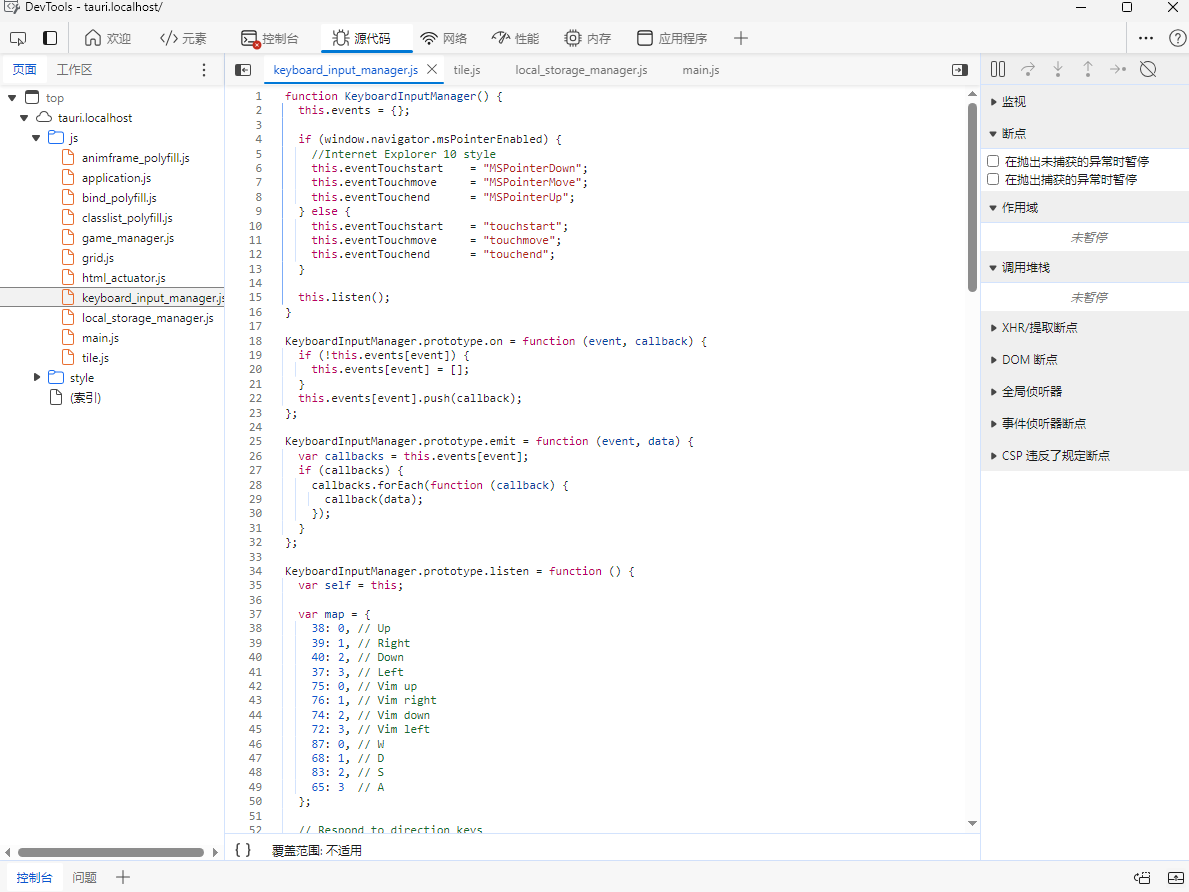
这个命令可以直接看到js文件

set WEBVIEW2_ADDITIONAL_BROWSER_ARGUMENTS=–disable-gpu –auto-open-devtools-for-tabs

image-20251017185717939

动调

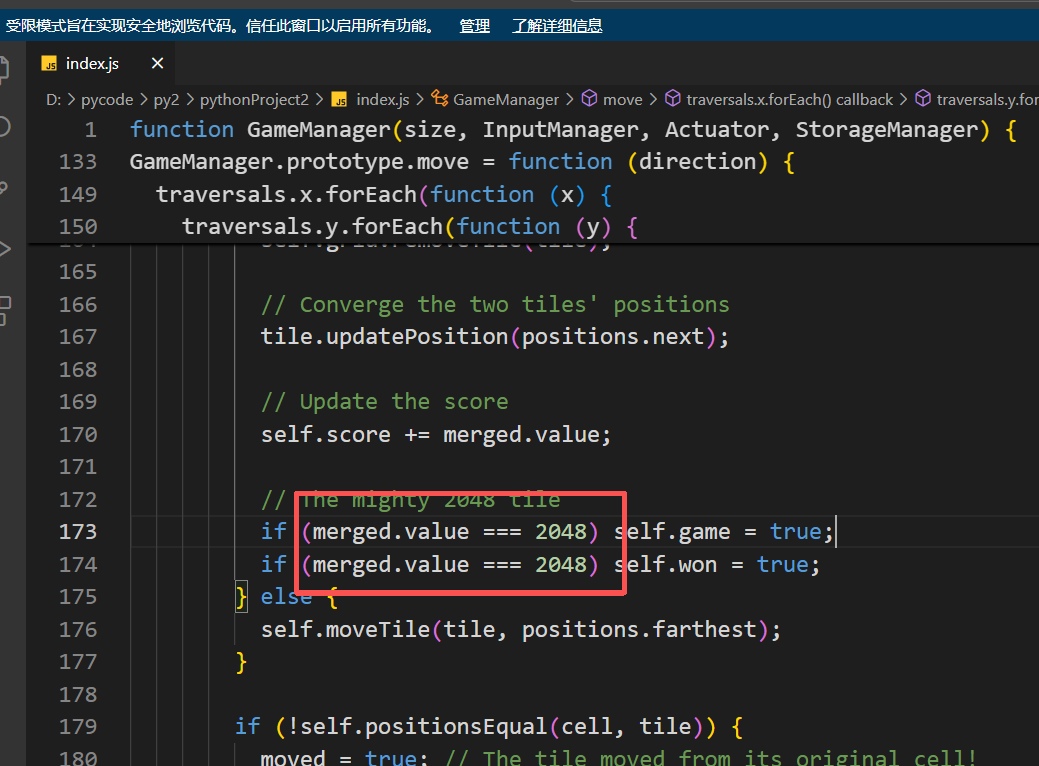
把取出来的index.js文件修改==8或者>2之类的再放进去

重新生成一个exe文件就可以动调去找后端代码

image-20251026170729968

plus

首先依旧用一些函数查看属性

1
2
3
4
5
6
7
8
9
10
11
12
13
14
15
16
17
18
19
20
21
22
23
24
25
26
27
28
29
30
31
32
33
34
35
36
37
38
39
40
41
42
43
44
45
46
47
48
49
['__builtins__', '__doc__', '__file__', '__loader__', '__name__', '__package__', '__spec__', '__test__', 'a2b_hex', 'b', 'c', 'e', 'exec', 'exit', 'i', 'int', 'm', 'p']
Help on module init:

NAME
init

FUNCTIONS
a2b_hex(hexstr, /)
Binary data of hexadecimal representation.

hexstr must contain an even number of hex digits (upper or lower case).
This function is also available as "unhexlify()".

exec(x)

exit = eval(source, globals=None, locals=None, /)
Evaluate the given source in the context of globals and locals.

The source may be a string representing a Python expression
or a code object as returned by compile().
The globals must be a dictionary and locals can be any mapping,
defaulting to the current globals and locals.
If only globals is given, locals defaults to it.

i = input(prompt=None, /)
Read a string from standard input. The trailing newline is stripped.

The prompt string, if given, is printed to standard output without a
trailing newline before reading input.

If the user hits EOF (*nix: Ctrl-D, Windows: Ctrl-Z+Return), raise EOFError.
On *nix systems, readline is used if available.

p = print(...)
print(value, ..., sep=' ', end='\n', file=sys.stdout, flush=False)

Prints the values to a stream, or to sys.stdout by default.
Optional keyword arguments:
file: a file-like object (stream); defaults to the current sys.stdout.
sep: string inserted between values, default a space.
end: string appended after the last value, default a newline.
flush: whether to forcibly flush the stream.

DATA
__test__ = {}
e = <unicorn.unicorn_py3.arch.intel.UcIntel object>

FILE
d:\pycode\py2\pythonproject\init.pyd

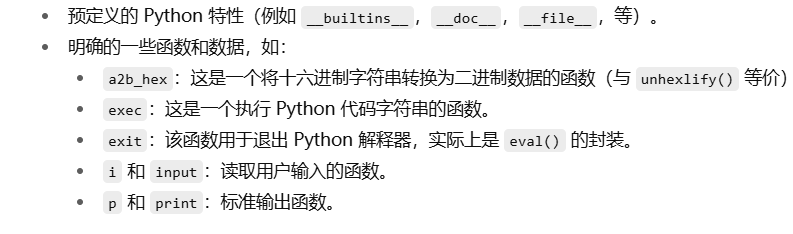
知道了i和p的作用,而且运行程序之后输出是[+]input your flag: 和no way!这种,可以猜测exec是转换成char的作用

image-20251017211923155

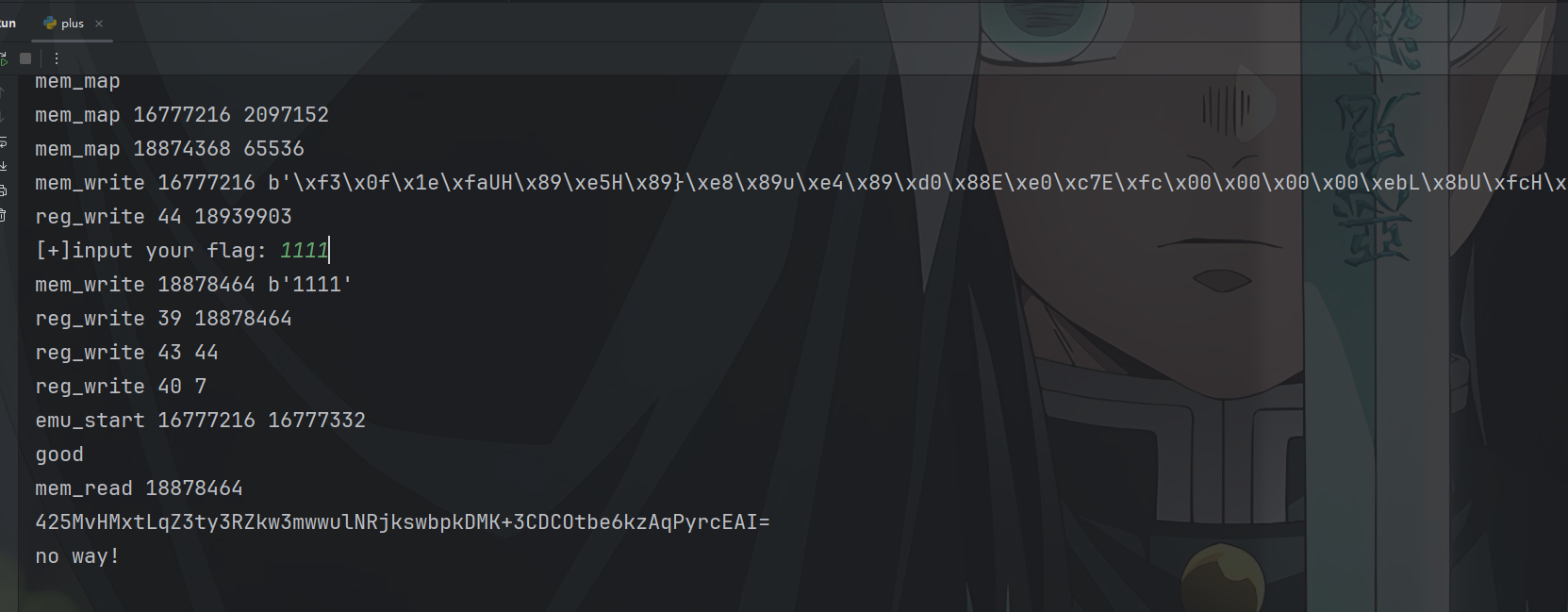
输出一下对比的密文和程序的逻辑得到一个机器码,写个脚本把它变成汇编语言可以发现加密逻辑是
arr[i] = (arr[i]*40 + (arr[i]^key)) mod 256

image-20251026193418279

1
2
3
4
5
6
7
8
9
10
11
12
13
14
15
16
17
18
19
20
21
22
23
24
25
26
27
28
29
30
31
32
33
34
35
36
37
38
39
40
41
42
43
import base64

# 输入:Base64 密文
b64 = "425MvHMxtLqZ3ty3RZkw3mwwulNRjkswbpkDMK+3CDCOtbe6kzAqPyrcEAI="
ct = base64.b64decode(b64)

# 映射方程(加密):
# c = (40*b + (k ^ b)) & 0xFF
# 这里实现它的逆查:给定 c 和 k,枚举所有可能的 b(0..255)
def preimages(c, k):
res = []
for b in range(256):
if ((40*b + (k ^ b)) & 0xFF) == c:
res.append(b)
return res

# 尝试所有单字节密钥 k,并使用可打印 ASCII 作为筛选条件
def try_find_plaintext(ct, require_printable=True):
candidates = []
for k in range(256):
ok = True
out_bytes = []
for c in ct:
p = preimages(c, k)
if require_printable:
p = [x for x in p if 32 <= x <= 126] # 只接受可打印 ASCII
if not p:
ok = False
break
# 若某字节有多个可选,这里先取第一个(通常题目能唯一确定)
out_bytes.append(p[0])
if ok:
candidates.append((k, bytes(out_bytes)))
return candidates

# 运行并打印所有候选
cands = try_find_plaintext(ct, require_printable=True)
if not cands:
print("No key produced fully printable plaintext with the simple heuristic.")
else:
for k, s in cands:
print("key =", k)
print("plaintext =", s.decode())